
TeachScript · Adaptive LMS
Know what each student actually knows.
TeachScript teaches, assesses and adapts in one place. Behind every question sits a knowledge tracing model that updates its estimate of mastery on every attempt — so practice, reporting and intervention all follow the learner.
ATTEMPT09P(MASTERY)0.91NEXT ITEM↑ HARDER
Nine attempts on one skill. The model discounts the early lucky guess, absorbs the slip at attempt four, and only calls mastery once the estimate clears the threshold.
Walkthrough
See TeachScript running a real class.
A short tour of course setup, an adaptive practice session, and what the teacher sees when a student starts to slip.
Press play to watch the walkthroughRuntime approx. 1 min
Product tour
Thirteen screens, and what to look at on each one.
Pick a point of view and walk it. Every screenshot is the real product, and the numbered pins on it explain the parts a screenshot alone would not.
Six screens, from opening a lesson to sitting in a live class.
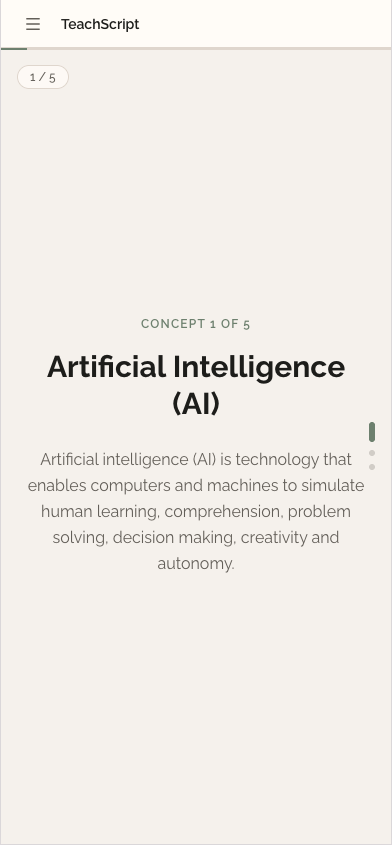
Step 1 of 6
A lesson that reads like a feed
One concept per screen, advanced with the same thumb motion students already use all evening — pointed at the syllabus instead of away from it.
Features
Everything you expect from an LMS, plus the part that’s missing.
Course delivery, assessment and administration are table stakes. The mastery model underneath is what changes how the platform behaves.
Adaptive learning engine
Each learner gets the next item chosen from their current mastery estimate — harder when they are ready, remedial when they are not.
Knowledge tracing analytics
A running probability of mastery per skill, per student, updated on every attempt and readable at learner, class or cohort level.
Course and content authoring
Build modules from text, video, files and embeds. Reorder by drag, version your changes, reuse across sections and terms.
Assessments and item banks
Auto-graded question types, pooled items, randomised ordering, timed attempts and per-item skill tagging.
Skill maps and prerequisites
Tag your curriculum once. TeachScript uses the map to trace gaps backwards and hold learners at a prerequisite until it is solid.
Classes, sections and terms
Enrolment, section rosters, co-teachers and term rollover without rebuilding a course from scratch each year.
Gradebook and reporting
Weighted categories, manual overrides, exportable transcripts, and reports built from attempt-level data rather than final scores.
Intervention alerts
Flags learners whose mastery is stalling or falling on a skill, with the specific items that triggered the flag.
AI lesson assist
Draft objectives, generate practice items against a skill, and get suggested reteach paths — always as a proposal a teacher approves.
Integrations and SSO
Single sign-on, roster sync, calendar and video links, plus an API for the systems your registrar already depends on.
Works on the phone they own
Responsive from the ground up, light on data, and resilient when a connection drops mid-attempt.
Roles, permissions and privacy
Admin, instructor, learner and guardian views with least-privilege defaults and a full audit trail on grade changes.
The engine
Adaptation that a teacher can explain.
Adaptive is an overused word. In TeachScript it means something specific: every question is tagged to a skill, every attempt updates that skill’s mastery estimate, and the next question is drawn from wherever the estimate is weakest and most consequential.
Because the model tracks skills rather than scores, it can tell the difference between a student who is guessing well and one who genuinely has it — and between a careless slip and a real misconception.
- Difficulty moves per skill, not per course
- Guesses and slips are modelled, not counted as truth
- Prerequisites gate progression when the gap matters
- Every recommendation traces back to the attempts behind it
The analytics
Reports that name the skill, not just the grade.
The analytics layer is powered by the same knowledge tracing algorithm that drives sequencing, so what teachers read is what the system is actually acting on.
- Learner view: mastery by skill, with the attempt history behind each number
- Class view: the three skills your section is weakest on this week
- Cohort view: mastery across sections, to compare and reteach
- Trend view: whether last term's intervention actually moved anything
Roles
Four people open TeachScript. They see four different things.
Learner
The next right question
A clean queue of work pitched at their level, with progress shown by skill rather than by percentage complete.
Instructor
Who needs me today
Class mastery at a glance, flagged students at the top, and the item-level evidence for why they were flagged.
Administrator
The institution’s picture
Sections, enrolment, term setup, permissions, and reporting that holds up in an accreditation review.
Guardian
Plain-language progress
An optional view showing what their child is working on and where they need support — without a wall of raw scores.
Setup and security
Live in a term, not a school year.
We migrate your existing courses, tag your skill map with your department heads, and train the teachers who will use it first.
- Guided migration from your current LMS or from spreadsheets
- Single sign-on with your existing school accounts
- Role-based access with least-privilege defaults
- Encrypted in transit and at rest, with a full export on request
- Data handling aligned with the Data Privacy Act
Typical pilot
One subject · one grade level · one term
Enough scope to prove the model works on your curriculum, small enough that nobody loses a semester if it does not.
- Kickoff and skill mapping in week one
- Content migrated before classes start
- Teacher training in a single session
- Review against agreed measures at term end
Questions
Before you ask us on a call.
No. You can import existing material and run TeachScript as a conventional LMS from day one. Adaptation switches on as you tag items to skills, which most departments do subject by subject over a term. We help with the first one.
An analytics add-on reports on scores after the fact. TeachScript maintains a live mastery estimate per skill and uses it to decide what the learner sees next. The reporting is a window onto the model that is already running the course.
You can export everything — courses, rosters, attempts, grades — in open formats, at any point, without asking us first. It is your institution’s record.
Yes. The interface is designed for small screens and limited data, sessions survive a dropped connection mid-attempt, and shared-device sign-in is handled without leaving one student logged into another’s account.
AI drafts — objectives, practice items, reteach suggestions. A teacher approves before anything reaches a student. The mastery model itself is a knowledge tracing algorithm, not a language model, so its outputs are inspectable and reproducible.
Put TeachScript in front of your teachers.
Bring one subject and its assessments. We will set up a working pilot and let the department decide.